
Quick Summary: A reliable Proof Approval DTF Virginia Workflow stops misprints before raw films hit the curing ovens. By reviewing file resolution, transparent layers, underbase choke, and physical dimensions on screen first, apparel makers and retail Brands avoid wasted garments, misaligned gang sheets, and unexpected color shifts on both Custom DTF Transfers and hard-surface UV Stickers.
Nobody wants unboxing day to reveal muddy graphics, missing text, or an accidental white box printed behind a logo. A structured digital proofing Workflow protects your bottom line by eliminating artwork discrepancies before ink ever hits transfer film.
It's tempting to think that uploading a file means hitting "print" five seconds later. But skipping a deliberate review creates brutal delays. An unrasterized glow suddenly prints as a solid chalky block. A 72 DPI thumbnail turns into a pixelated mess across a gang sheet. Taking three minutes to check an electronic Proof guarantees that what you built on your screen matches what lands on your pressing table.
Why Is Proof Approval Essential for Virginia Apparel Brands?
Commercial printing carries real physical stakes. Direct to film uses white ink underbases to give Transfers their opacity and stretch on cotton, poly, and mixed blends. UV DTF Stickers rely on high-tack adhesive and an instant UV-cured varnish to grip glass, metal, and acrylic. When artwork files carry hidden flaws, our machines print those flaws permanently.
The traditional printing industry has leaned on this step for centuries. As outlined in the Proof (printing) – Wikipedia article, proofing creates a reliable prediction of press output before running production. For digital heat Transfers, that check ensures CMYK values translate properly and transparent backgrounds don't drag stray gray pixels onto your film.
Common File Flaws Caught During Proofing
- Unwanted Background Boxes: Graphics grabbed from web pages often carry faint off-white boxes that print as solid white blocks on dark garments.
- Dropout on Soft Gradients: Subtle drop shadows and feathered glows lack the hard edges needed for digital white backing, turning into grainy rings.
- Typographical Disasters: Un-outlined text frequently triggers font substitutions during file transfer.
- Scale Mismatches: A logo saved at 72 DPI can fill your monitor but shrink to barely three inches wide when processed at true print resolution.
Catching these oversights early keeps print queues moving. Dtf Nova Print provides Custom DTF Transfers and UV Stickers with vibrant colors and durable prints for apparel, branding, and promotions without imposing minimum order requirements. Whether you need five Custom prints for a test run or hundreds of sheets for a wholesale client, the file verification standard stays the same.
How Does the Proof Approval DTF Virginia Workflow Prevent Costly Reprints?
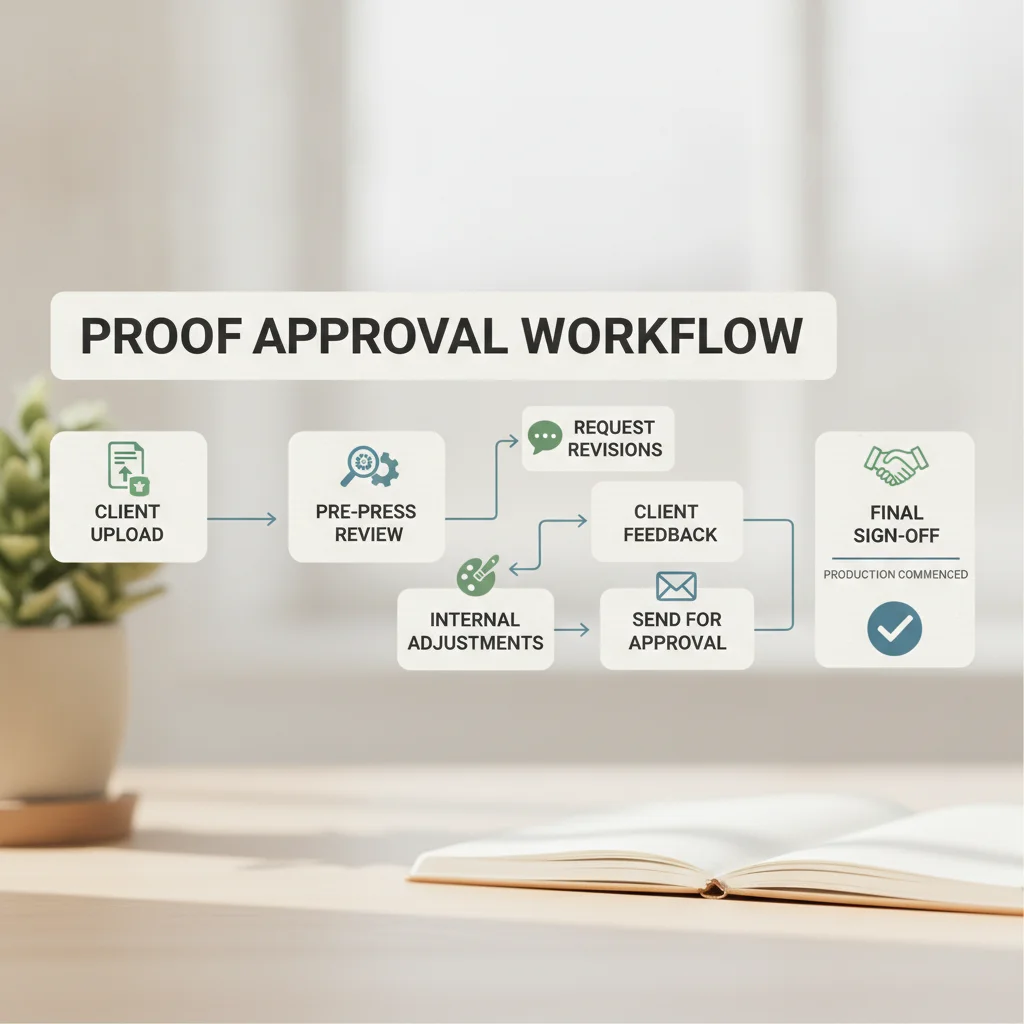
We don't rely on quick visual glances. When a file enters the queue, automated pre-flight tools inspect resolution, layer structure, and color tags. From there, a print technician reviews vector paths, color values, and underbase registration.
This step prevents costly reprints by separating human aesthetic intent from machine compatibility. A computer monitor forgives slight color drop-offs and dirty pixels. Printheads do not.
| Proof Check Element | Custom DTF Transfers (Apparel) | UV DTF Stickers (Hard Surfaces) |
|---|---|---|
| Substrate Purpose | T-shirts, hoodies, canvas bags, hats | Tumblers, phone cases, wood, glass, metal |
| Resolution Standard | 300 DPI at 100% final physical print scale | 300 to 600 DPI for micro-lettering clarity |
| White Ink Underbase | Choked 1-2 pixels inside CMYK edges | Solid white layer backing under clear varnish |
| Finish Simulation | Matte or semi-gloss flexible hot/cold peel | 3D embossed gloss varnish finish |
| Primary Review Risk | Semi-transparent glows causing powder clumps | Lines under 1pt losing adhesive grip |
Evaluating your files against these technical demands saves hours of head-scratching. Head over to the DTF Nova Blog for more printing tips to see how specific color settings impact print saturation across light and dark fabrics.
The Six-Stage DTF Nova Proof Workflow Explained
Here is what happens behind the scenes once you hand off your designs:
- File Preparation and Upload: You send in your gang sheet or single design through our upload portal with transparent backgrounds and outlined fonts.
- Automated RIP Ingestion: Our raster image processor scans the artwork, flagging poor DPI, missing assets, and overlapping cut lines.
- Manual Technician Inspection: A print tech checks your white underbase choke so white ink won't bleed past your color borders.
- Electronic Proof Dispatch: A digital Proof hits your inbox with dimensions, placement grids, and an underbase simulation overlay.
- Brand Review and Sign-Off: You inspect the Proof, confirm sizing and copy, and either hit approve or submit your revision notes.
- Production Release: The moment you approve the Proof, the job routes directly to our printers.
Clear communication during this six-stage Workflow stops misunderstandings early and ensures identical repeat batches for scaling clothing lines.
The Print Approval Checklist for Custom Transfers and UV Stickers

Don't approve proofs on a phone while walking down the street. Phone screens use punchy OLED displays that misrepresent how ink settles on film and fabric. Sit at a desktop monitor and run through this list before you click sign-off.
Print Approval Inspection Checklist
- □ Verify Physical Dimensions: Check the measurements in inches. If you want a 10.5-inch chest graphic, verify that exact number instead of assuming it matches page scale.
- □ Inspect Text and Micro-Details: Zoom in to 200%. Check spelling, web addresses, and font outline status.
- □ Check Negative Space: Look inside enclosed letters like 'A', 'e', 'O', and 'P' to verify the centers are truly transparent.
- □ Evaluate Color Conversions: RGB screens show neon greens and bright blues that fall outside CMYK ink limits. Expect physical prints to show deeper, slightly darker tones.
- □ Confirm Line Thickness: Fine strokes need to measure at least 0.02 inches (about 1.5 to 2 points) so they hold enough adhesive powder for wash durability.
- □ Verify Gang Sheet Margins: Keep all graphics at least 0.25 inches inside the film boundaries to prevent edge clipping during slitting.
Running through this checklist item by item prevents simple file oversights from ruining an entire run of blanks.
If you have questions about tricky vector cutlines or tight gradients, Contact DTF Nova for Proof assistance before you commit an order to the press.
Clear Turnaround Expectations and Production Timelines
Turnaround speed drives apparel production. When you have drop dates and client deadlines on your calendar, you need predictable milestones. Proofing doesn't slow that down if you keep files clean.
Most standard proofs go out within two to four business hours after upload. Approve the Proof promptly, and your gang sheet heads directly to the print floor. Dtf Nova Print offers printing services with no minimum order requirement alongside unbeatable turnaround times and fast shipping options. Quick Proof sign-offs keep modern high-speed printing queues running without interruption.
Understanding Revision Cycles
If you spot a typo, don't write "approved, but please fix the spelling of Richmond." Upload a corrected file instead. That triggers an updated Proof, giving you a fresh visual check before raw materials run through our machines. It adds a short beat to production, but it completely removes guesswork on the shop floor.
Frequently Asked Questions About DTF and UV Sticker Proofing
What is the turnaround time for a digital print Proof?
Digital proofs for standard Custom DTF gang sheets and UV Stickers are typically generated within 2 to 4 business hours after file submission.
Can I see where white ink prints on a digital Proof?
Yes. Digital proofs display a dedicated white ink underbase simulation layer against a contrasting grid so you can verify opacity and cut lines.
What file format prevents Proof Approval delays?
High-resolution transparent PNG or vector PDF files exported at 300 DPI in CMYK color mode offer the fastest processing without revision flags.
Does approving a print Proof lock the order into production?
Yes. Once you provide final digital sign-off, the artwork routes immediately to the automated rip software and direct-to-film printers to maintain fast turnaround times.
Ready to Print Your Next Collection with Confidence?
Save your checklist, prep your gang sheets at 300 DPI, and experience quick, error-free printing. Upload your designs to DTF Nova today for vibrant, dependable Transfers and Stickers built to last.